Manual vs Automated Footer Updates: Which is Better?
Compare manual vs automated footer updates—trade-offs in time, cost, scalability, consistency, and SEO for single or multi-site setups.
Updating website footers is essential for legal compliance, branding, and SEO - but which method is best for you?
Manual updates offer flexibility and control but are time-consuming and prone to errors, especially for businesses managing multiple sites. Automated updates save time, ensure consistency, and reduce mistakes but require technical expertise and upfront investment.
Key Points:
Manual Updates: Ideal for single sites or small portfolios. Provides customization but is labor-intensive and error-prone.
Automated Updates: Best for larger portfolios. Saves time, ensures uniformity, and improves efficiency but requires technical setup.
Quick Comparison:
Criteria | Manual Updates | Automated Updates |
|---|---|---|
Time Efficiency | Slow, repetitive for multiple sites | Fast, real-time updates across sites |
Scalability | Limited as site count grows | Easily handles large portfolios |
Consistency | Prone to human error | Uniform and accurate |
Technical Skills | Basic CMS knowledge required | Requires coding and automation expertise |
Cost | Low upfront, high ongoing labor costs | Higher upfront, lower long-term costs |
If you manage a few sites, manual updates may suffice. For larger networks, automation tools like 1Footer can centralize and simplify updates, saving time and reducing errors.
Manual vs Automated Footer Updates: Complete Comparison Guide
Manual Footer Updates: Pros and Cons
How Manual Updates Work
Manual updates involve logging into each website individually to modify the footer through the CMS or directly in the code. For Block Themes, navigate to Appearance > Editor > Patterns > Footer, while Classic Themes rely on the Customizer or Widgets panel. Developers can also edit the footer.php file through FTP/SFTP, located under /wp-content/themes/[theme-name]/. It's essential to activate a child theme to ensure your changes aren't overwritten during updates .
Before diving into the footer.php file, always create a full site backup to avoid unintended layout disruptions. Once edits are made - whether updating copyright notices, adding social media icons, or tweaking navigation menus - you save or publish the changes. Then, you repeat the process for every other site in your portfolio .
For those managing multiple sites, this repetitive process can amplify both the advantages and challenges of manual updates. However, it does provide a foundation for creating highly tailored footer designs.
Benefits of Manual Footer Updates
Manual updates offer unmatched flexibility when it comes to customization. You can fine-tune fonts, colors, and element placement to align perfectly with your brand. This approach is especially useful for creating unique footers on specific landing pages or integrating advanced elements like newsletter signup forms that may not fit standard templates .
For single-site owners or those managing a small number of websites, the process is relatively straightforward. It doesn't require advanced technical tools or automation systems, making it a practical choice for quick adjustments.
Drawbacks of Manual Updates
While manual updates provide customization options, they come with notable downsides. The biggest challenge is the time investment. For those managing multiple sites, the repetitive nature of manual edits can quickly become overwhelming as the portfolio grows. For instance, TravelBooker experienced a 68% traffic drop in just two weeks after manually managing 200 keyword-heavy links, ultimately requiring a complete footer overhaul.
Another issue is the potential for errors. Manual processes increase the likelihood of missing updates on certain sites, leading to inconsistent branding or even broken code that disrupts layouts . HealthFirst, for example, saw a 45% drop in search visibility after manual errors triggered a Google penalty, forcing a full network redesign.
"Managing WordPress sites isn't a passive job - it's something you need to stay on top of 24/7. Waiting too long to check in on your sites is risky".
Finally, manual updates can leave sites vulnerable to security risks. Missing critical patches during the process increases the chances of exploits.
Automated Footer Updates: Pros and Cons
How Automated Updates Work
Automated footer updates simplify the process of managing multiple websites by allowing changes to be made from a single dashboard. Instead of logging into each site individually, updates can be deployed across all sites simultaneously, saving time and effort. The complexity of implementation depends on the task. For example, a simple JavaScript snippet using DOMContentLoaded and new Date().getFullYear() can automatically refresh copyright years every January 1st. For more comprehensive updates, platforms like Framer, HubSpot, or Cloudflare use script embeds, APIs, or Cloudflare Worker delivery paths to manage entire footer sections.
Advanced solutions often include tools like Visual Regression Testing (VRT), which identify layout or CSS issues before updates go live. These systems are especially useful for enterprise teams, as they allow updates to be tested across Development, Test, and Live environments, ensuring only verified changes reach production. This centralized approach offers both efficiency and consistency.
Benefits of Automated Updates
The biggest perk of automated updates? They save time. Take DigiSavvy, a digital marketing agency in Los Angeles, as an example. Before switching to automation in October 2022, they spent nearly 50 hours each month manually maintaining footers across about 100 client websites. By automating this process, they eliminated those 50 hours, enabling growth without the need for additional developers.
Automation also ensures consistency across all websites. Legal disclaimers, privacy policies, and product references remain uniform, which is crucial for maintaining brand integrity and compliance. This consistency extends to credibility - automated scripts prevent outdated copyright years, which can make websites appear neglected.
"A footer with an outdated date gives an impression of neglect - or even abandonment - which harms the website's credibility." - Lucas Clairet, Creative Solutions Developer
There's even an SEO advantage. Modern automation tools deliver footer content as crawlable HTML, making it easier for search engines and AI crawlers to index your links. For instance, YouTubeChapters saw its domain rating jump from 8 to 14 just days after introducing automated footer management. Similarly, Olof Harrysson of madebyolof.com reported an increase in his Domain Rating from 9 to 16 using the same approach.
Drawbacks and Technical Requirements
However, automated updates aren’t without challenges. Setting up automation requires technical expertise. You'll need a solid understanding of JavaScript for dynamic content, CSS Flexbox or Grid for responsive layouts, and ARIA labels to ensure accessibility compliance. Your footer also needs to meet WCAG 2.1 AA standards, which include features like keyboard navigation, screen reader compatibility, and support for 200% zoom.
Automation also comes with risks. Bugs in an update or deployment errors can disrupt site functionality. This is why tools like Visual Regression Testing and rollback options are critical for minimizing downtime.
Performance is another concern. Heavy JavaScript or overly complex footer markups can slow down page loading, negatively impacting Core Web Vitals. Additionally, the number of links in a footer matters. Footers with more than 12 links can see user engagement drop by 40%, and excessive automated links may dilute page authority, as footer links generally carry only 15–20% of the ranking power compared to links within main content.
Manual vs Automated: Side-by-Side Comparison
Comparison Criteria
When managing multiple sites, choosing between manual and automated footer updates boils down to five key factors. Time efficiency measures how quickly updates can be rolled out across your sites. Multi-site scalability looks at whether your method can adapt as your business grows. Consistency ensures updates are applied uniformly across all sites. Technical requirements involve the skills and tools needed to implement changes. Finally, cost includes both the initial investment and ongoing expenses.
These aren't just theoretical considerations - they directly impact your bottom line. For instance, inefficiencies in manual processes can cost companies 20% to 30% of their annual revenue. No wonder 71% of companies are prioritizing automation by 2025 to curb these losses. The best approach depends on your site count, growth plans, and available resources. The table below breaks down these criteria for a clearer comparison.
Comparison Table
Here’s a detailed look at how manual and automated updates stack up:
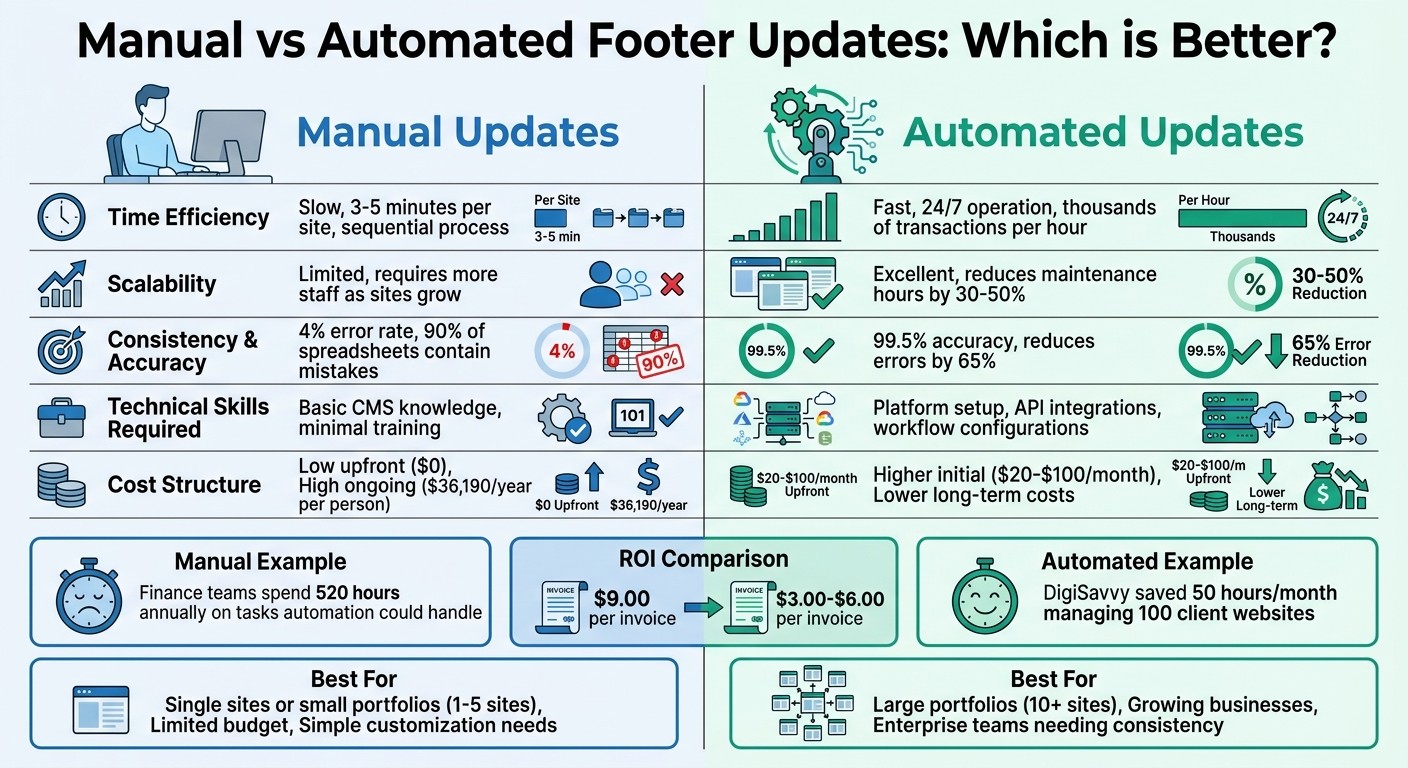
Criteria | Manual Updates | Automated Updates |
|---|---|---|
Time Efficiency | Slow and sequential; takes about 3–5 minutes per site. Finance teams spend around 520 hours annually on tasks automation could streamline. | Fast; operates 24/7 and processes thousands of transactions per hour. Allows for real-time or near-real-time updates. |
Multi-site Scalability | Limited; requires more staff as site count increases. | Excellent; scales effortlessly with software licensing. Reduces maintenance hours by 30–50% for many organizations. |
Consistency | Error-prone due to human fatigue. Manual data entry often has a 4% error rate. Studies show 90% of spreadsheets contain mistakes. | Highly accurate; automated systems achieve 99.5% accuracy. Ensures uniform updates, cutting errors by up to 65%. |
Technical Requirements | Minimal; basic CMS or spreadsheet skills suffice. Requires little training. | More complex; involves platform setup, API integrations, and workflow configurations. May also require tools like Visual Regression Testing. |
Cost | Low upfront costs (uses existing staff and tools). High ongoing labor expenses - median wage is $17/hour or $36,190 annually per person. | Higher initial software investment ($20–$100+ per month). Lower operational costs over time. Automation can handle up to 40% of primary controls. |
For example, processing invoices manually costs about $9.00 per invoice, while automation reduces this to $3.00–$6.00. Similarly, automating card-on-file updates can deliver an ROI of 5X to 40X compared to manual methods. At scale, these savings make automation a game-changer for businesses managing a growing number of sites.
Using 1Footer for Multi-Site Footer Management
What 1Footer Does
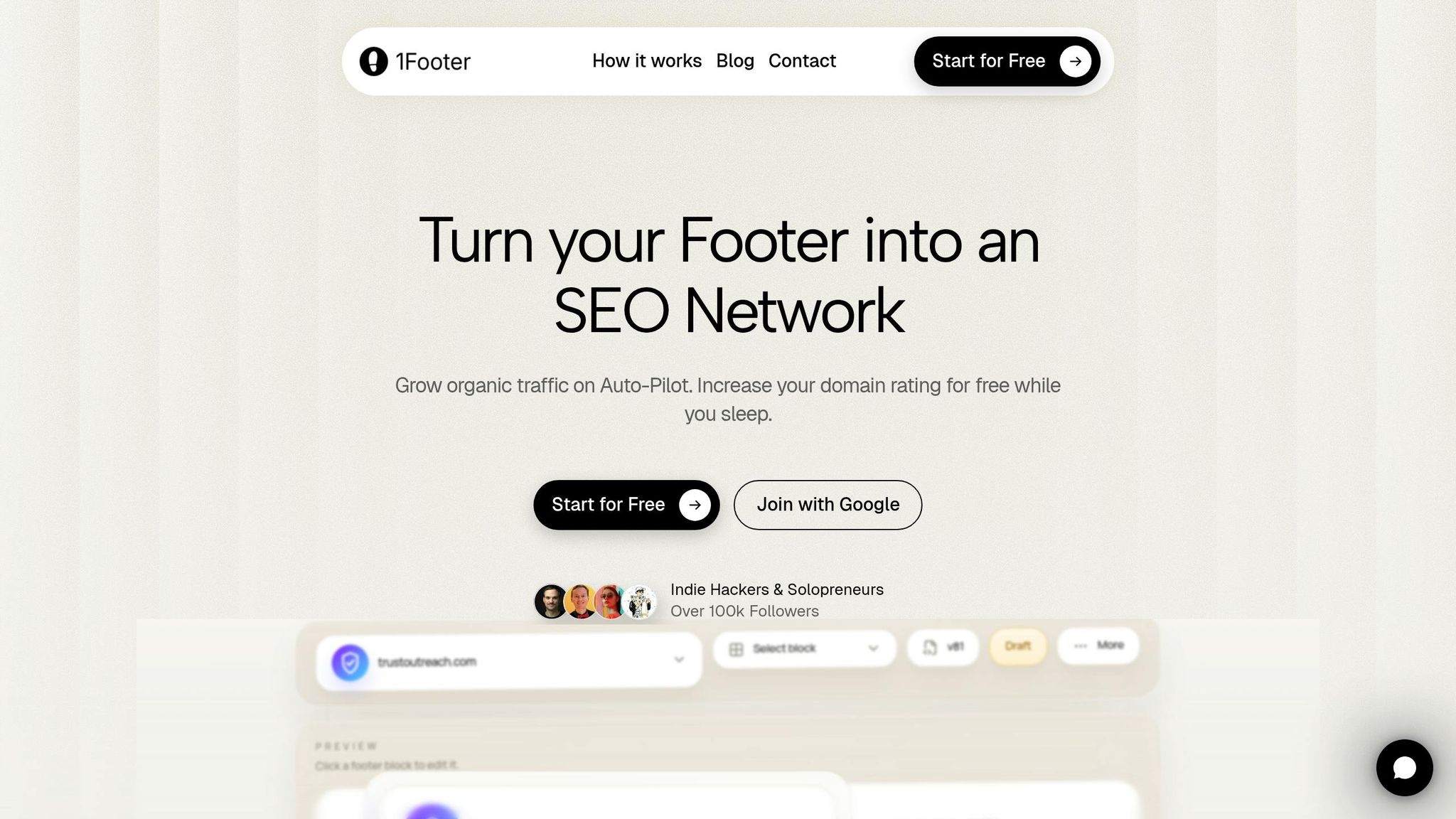
1Footer simplifies the process of managing footers across multiple websites by centralizing updates into one dashboard. Instead of manually editing each site, you can make changes - like updating legal links, product references, or copyright dates - and apply them to all connected sites at once.
This tool was born out of a common frustration. Indie hacker Daniel Sinewe shared his experience:
"1Footer exists because I got tired of manually updating footers across all my indie projects every time I launched something new."
With this centralized system, inconsistencies and outdated information become a thing of the past. Whether you're adding a new project to your portfolio or updating your privacy policy, every site connected to 1Footer stays aligned.
Main Features and How They Help
1Footer doesn’t just save time - it also boosts SEO by serving crawlable HTML for footer links. For instance, Aditya Ojha experienced a 71% increase in domain rating after using 1Footer. Through a single interface, you can manage everything from legal links and product references to badges and cross-project connections. Plus, it integrates seamlessly with your existing tech stack.
Here’s an example: YouTubeChapters.com saw its domain rating jump from 8 to 14 within just a few days of implementing 1Footer in 2024.
Why Multi-Site Teams Choose 1Footer
For web developers and digital marketing teams, 1Footer is a game-changer. It eliminates the hassle of outdated copyright dates and ensures consistent branding across all sites. What used to take hours can now be done in minutes, with users like Olof Harrysson reporting significant improvements in domain ratings.
Another reason teams are drawn to 1Footer? Its accessibility. With a "Start for Free" tier, smaller teams can try it out without any upfront commitment, making it an easy choice for those looking to streamline their workflow.
Best Practices for Footer Updates
Maintaining Consistency Across All Sites
Stick to global templates whenever you can. Tools like the Site Editor or Theme Builders allow you to create a single footer template that applies uniformly across your entire site network.
If you're working directly with code, use a child theme to safeguard your customizations. This way, WordPress updates won’t overwrite changes made to files like footer.php or other core components. For classic themes, manage content through Widgets or the Customizer menu instead of hardcoding it into theme files.
Always preview changes before making them live. Use the Customizer or a staging environment to catch potential layout issues. After updating, clear all caches - browser, plugin, and server-level - to ensure the latest version of your footer displays correctly for every visitor.
By following these steps, you can maintain a consistent and functional footer design across all your sites.
Common Mistakes to Avoid
Even with a solid plan, overlooking small details can lead to big issues.
Broken links are a frequent problem in footers. If you update or remove any links - especially to legal or promotional pages - set up 301 redirects to prevent users and search engines from encountering 404 errors. Make it a habit to check all footer links regularly, especially after manual updates.
Ignoring mobile users can cause major headaches. Multi-column footers often don’t translate well to smaller screens. Test your footer on different devices and screen sizes after each update. For mobile, consider using expandable sections (like accordions) to save space while keeping links easy to access.
Accessibility issues are another critical concern. Your footer should meet WCAG standards, including a minimum color contrast ratio of 4.5:1. Avoid using fonts smaller than 16px on mobile devices, and never hide text with CSS in the footer - this can hurt your SEO. Lastly, don’t overcrowd your footer. Organize content into logical categories with clear headers like "Support", "Company", and "Legal" to make it easier for users to navigate.
Planning for Growth
As your site network grows, addressing foundational issues becomes even more important.
Automate dynamic content whenever possible. This reduces repetitive tasks and keeps your site running smoothly.
"Automate everything that can be automated. The more self-sufficient your website is, the fewer repetitive tasks you'll need to manage"
Something as simple as an outdated copyright date can make your site look neglected, leaving visitors with a bad impression.
Standardize your starter projects by including essential footer scripts and configurations in a base template. This ensures every new site in your network starts with the correct footer structure. For teams managing multiple sites, use uptime monitoring tools to check site performance regularly and ensure footer updates don’t cause downtime. Implement user logging to track who makes changes and when - this is invaluable for troubleshooting issues in multi-user setups.
Before rolling out major updates, always create a full site backup. This safety net lets you quickly restore functionality if something goes wrong.
"Managing multiple WordPress websites can quickly become overwhelming... The more sites you manage, the more demanding the job becomes"
Conclusion: Choosing the Right Approach
Key Takeaways
Manual updates give you control but can be time-consuming and inefficient, especially as your website portfolio grows. On the other hand, automation ensures consistency and reduces errors. For example, one agency saved 50 hours each month by automating updates, which allowed them to scale without hiring additional developers.
Automation also eliminates common mistakes - like forgetting to update copyright dates - that can make your site seem outdated and harm your credibility. For teams managing multiple sites, automated updates save time and ensure brand consistency across platforms. Adding tools like Visual Regression Testing (VRT) can help catch layout or CSS issues before deployment, making automation even more reliable.
Ultimately, the right strategy depends on your needs. If you manage just one or two sites with minimal updates, manual methods may work fine. But for larger portfolios or enterprise-level environments with Dev, Test, and Live workflows, automation becomes a necessity.
Expert Advice and Tools
The best approach aligns with your team's scale and technical resources. Start small by automating simple tasks, like using JavaScript snippets to update copyright years. As Lucas Clairet, Creative Solutions Developer at Digidop, advises:
"Automate everything that can be automated. The more self-sufficient your website is, the fewer repetitive tasks you'll need to manage".
For teams managing multiple sites, tools like 1Footer provide a practical solution. With 1Footer, you can update a single footer across multiple websites while maintaining crawlable HTML, ensuring your legal and navigation links stay consistent.
Don’t forget to prioritize safety by using backups and testing environments. If you're overseeing dozens or hundreds of sites, investing in tools that support multi-environment workflows and include visual testing is a smart move. It can save you from costly downtime and help maintain your professional reputation.
How to Auto Update the Copyright Year in a WordPress Footer?
FAQs
When should I switch from manual to automated footer updates?
When updating footers manually starts taking too much time, leads to mistakes, or becomes difficult to manage across several websites, it’s time to consider automation. Automating footer updates keeps content consistent and current with far less effort - this is especially helpful for tasks like adjusting footer dates. If manual updates are causing delays, errors, or adding unnecessary strain, automation can streamline the process and minimize risks, particularly when dealing with multiple sites or content that changes often.
What’s the safest way to roll out automated footer changes without breaking layouts?
To handle updates smoothly and securely, consider using a reliable, script-based solution directly within your website environment. Always test any changes in a staging environment first - this helps ensure nothing disrupts your layouts or functionality. A secure JavaScript snippet can be particularly useful for targeting specific elements, like footer text. This approach allows you to make precise updates while maintaining your site's layout and automating the process efficiently.
Will automated footers hurt page speed or SEO?
When done right, automated footers generally won't hurt your page speed or SEO. In fact, they can enhance your site's structure and internal linking, which is great for SEO. That said, steer clear of keyword stuffing or overly complicated designs - they can do more harm than good. By using well-optimized automation tools, you can keep load times in check, providing a smooth and scalable experience without sacrificing performance.