
Best Practices for Multi-Site Navigation Links
Managing navigation across multiple websites can be tricky. Inconsistent labels, missing links, or outdated menus confuse users and hurt SEO. A unified approach ensures a better user experience, stronger search engine signals, and compliance with legal requirements.
Key Takeaways:
Consistency is key: Standardize navigation labels, URLs, and layouts across all sites to build trust and improve usability.
Legal compliance matters: Include required links like Privacy Policy, Terms of Use, and Accessibility Statement to avoid fines.
Optimize for mobile: Keep navigation items in the same order across devices and ensure touch targets meet accessibility standards.
Governance is critical: Assign ownership, maintain a central navigation registry, and audit regularly to prevent issues.
Quick Tips:
Use a master navigation framework to define shared elements and layouts.
Standardize key links like
/privacy-policyand avoid vague anchor text like "Click here."Tools like 1Footer simplify managing footers across multiple sites, ensuring updates are consistent and SEO-friendly.
By focusing on these strategies, you can streamline navigation, enhance usability, and keep your sites compliant.
Best Practices for Website Navigation and Organisation | Build a Website | Web Development Practices
Establishing Consistency in Multi-Site Navigation Links
Navigation plays a critical role in shaping how users interact with your site and how search engines interpret your content. When users encounter consistent navigation labels and layouts across multiple domains, it creates a sense of familiarity and trust. If that consistency breaks, trust can quickly erode.
Build a Master Navigation Framework
Consistency starts with a unified approach. A master navigation framework serves as the blueprint for your entire site network. It defines key elements like navigation categories, their order, and which links are shared across all sites versus those that are site-specific.
To get started, identify shared content blocks - universal categories like Legal, Products, Resources, and Social Profiles. Once these are mapped, document the exact order for both primary menus and footers. Use reusable code components like shared templates or JSX components to enforce this structure across all sites. This approach reduces manual updates and ensures consistency, avoiding issues like repository drift.
"Navigation is not just a design element - it is a business tool. Websites with clear, well-structured navigation see up to 50% lower drop-off rates." - Lena Tarhonska, CEO, Vezert
Standardize Navigation Labels and URLs
After establishing a framework, focus on standardizing labels and URLs. Use clear, task-oriented labels that are easy to understand. For example, "Contact Us" is more straightforward than "Reach Out", and "Privacy Policy" is clearer than "Legal Info." Users should never have to guess where a link will take them.
URLs should follow a consistent pattern across all domains. Pages like Privacy Policy, Terms of Use, and Contact should use uniform URLs, such as /privacy-policy, /terms-of-use, and /contact. This predictability benefits both users and search engines. Avoid generic anchor text like "Click here" or "Learn more", as these provide no context. Instead, use descriptive, keyword-focused anchor text that aligns with the destination page’s title.
Additionally, compliance with WCAG 3.2.3 mandates that repeated navigation elements must appear in the same order across pages. This isn’t just a best practice - it’s an accessibility requirement.
Align Navigation Across Devices
With mobile devices projected to account for 60% of web traffic by 2026, aligning navigation across screen sizes is essential. The guiding principle is simple: navigation items must appear in the same sequence on desktop and mobile, even if the layout changes (e.g., a horizontal menu becomes a hamburger menu).
On mobile, prioritize the top 3–5 primary actions and organize secondary links within accordions or submenus. Ensure touch targets are at least 44x44 pixels to meet accessibility standards and maintain Core Web Vitals compliance. For pages with long scroll depths, sticky navigation can keep important links like "Contact" or "Get Started" visible without requiring users to scroll back to the top.
Here’s a quick comparison of common navigation patterns and their key considerations:
Menu Pattern | Best For | Key Consideration |
|---|---|---|
Sticky Nav | Sites with critical CTAs | Always visible but takes up screen space |
Hamburger Menu | Mobile and minimalist designs | Saves space but hides options behind a tap |
Mega Menu | Large e-commerce or content-heavy sites | Great for depth but complex on mobile |
Finally, always use semantic HTML for navigation. Wrap menus in <nav> tags and include descriptive aria-label attributes. This ensures your navigation is accessible to screen readers and search engine crawlers. By aligning navigation strategies across devices, you can maintain consistency and improve the overall user experience.
Ensuring Legal Compliance Across Multi-Site Navigation
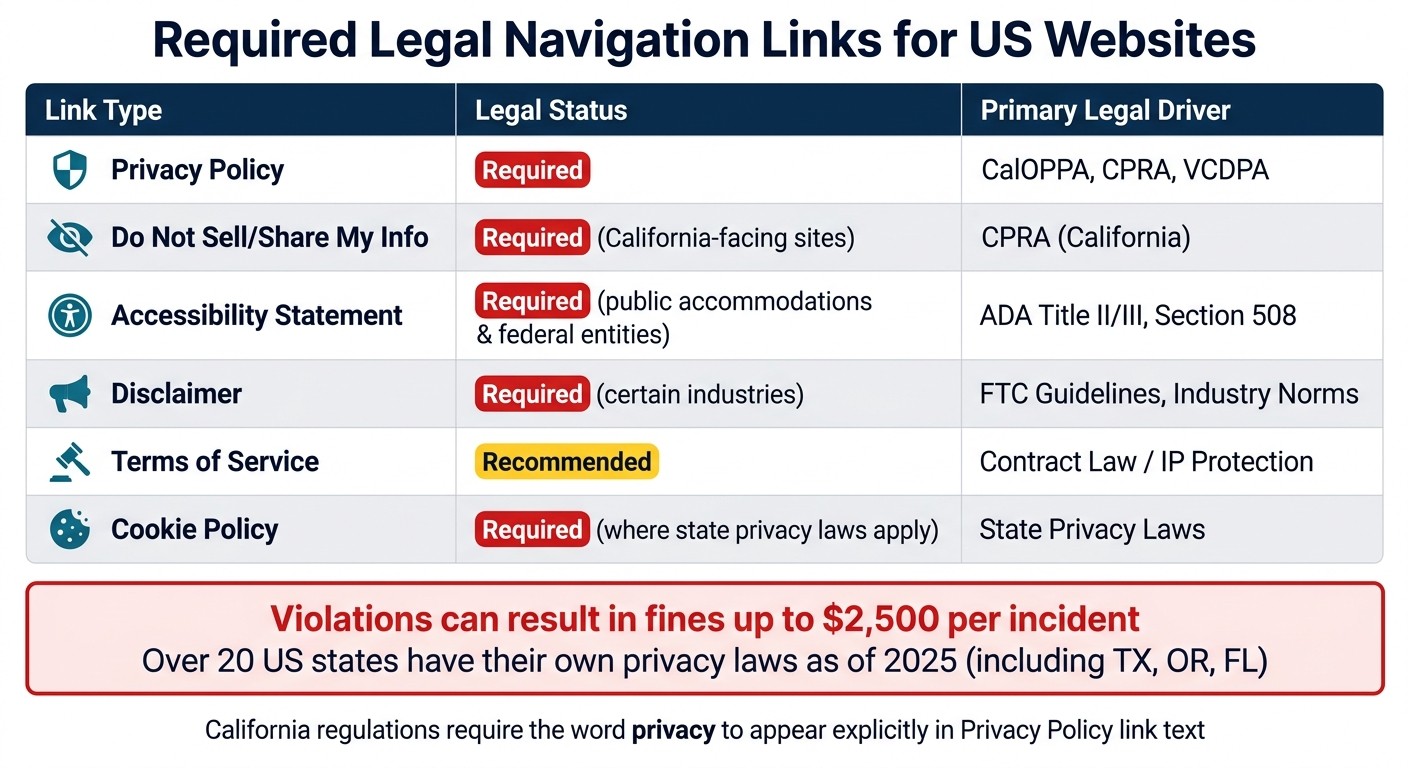
Required Legal Navigation Links for US Websites: Compliance Guide
Required Legal Links for US-Based Sites
Legal links in your website's navigation aren't just a best practice - they're often a legal requirement. If your site collects any form of Personally Identifiable Information (PII) - like names, email addresses, IP addresses, or cookies - a Privacy Policy is mandatory under various state laws, including CalOPPA, CPRA, and VCDPA.
"Privacy laws DO NOT only apply to businesses within that state or country. If your website collects personally identifiable information from visitors... data privacy laws may still apply to you." - Emily White, Web Designer, Design Powers
For US-based sites, here are the essential legal links that should appear in your footer navigation:
Link Type | Legal Status | Primary Driver |
|---|---|---|
Privacy Policy | Required | CalOPPA, CPRA, VCDPA |
Do Not Sell/Share My Info | Required for California-facing sites | CPRA (California) |
Accessibility Statement | Required for public accommodations and federal entities | ADA Title II/III, Section 508 |
Disclaimer | Required in certain industries | FTC guidelines, industry norms |
Terms of Service | Recommended | Contract law / IP protection |
Cookie Policy | Required where state privacy laws mandate disclosure | State privacy laws |
Each of these documents should be clearly labeled and easy to locate. For instance, California regulations require the word "privacy" to be explicitly included in the Privacy Policy link text. Ensuring proper labeling helps meet legal standards while maintaining user trust.
Handling Legal Link Variations by Jurisdiction
Navigating the patchwork of state-specific legal requirements can be tricky, especially with over 20 states (including Texas, Oregon, and Florida) having their own privacy laws by 2025. To stay compliant, consider using contextual footers.
A contextual footer maintains a consistent structure across all sites, displaying universal links - such as Privacy Policy and Terms of Service - while incorporating jurisdiction-specific links where needed. For example, a California-specific "Do Not Sell or Share My Personal Information" link should always follow the Privacy Policy link. This approach keeps navigation predictable for users while addressing state-specific legalities.
Ignoring these nuances can be costly - violations may result in fines of up to $2,500 per incident.
Accessibility Requirements for Navigation Links
Legal compliance isn't limited to privacy laws; accessibility is equally critical. The Department of Justice has consistently stated that the ADA applies to web content provided by public accommodations.
"The Department has consistently taken the position that the ADA's requirements apply to all the goods, services, privileges, or activities offered by public accommodations, including those offered on the web." - U.S. Department of Justice
To ensure your navigation links meet accessibility standards, focus on these key WCAG guidelines:
WCAG 2.4.4 (Link Purpose): Make sure every link's purpose is clear from its text - avoid generic labels like "click here" or "read more".
WCAG 2.4.1 (Bypass Blocks): Provide a "Skip to Main Content" link at the top of each page to help keyboard users bypass repetitive navigation.
WCAG 2.4.7 (Focus Visible): Ensure a visible focus indicator (like an outline) appears when users tab to a link.
WCAG 1.4.3 (Contrast): Ensure navigation text has a contrast ratio of at least 4.5:1 against its background.
Additionally, use <nav> tags to wrap navigation sections, apply aria-label attributes to distinguish between primary and footer navigation, and use aria-current="page" to highlight the active link for screen readers. These features not only ensure compliance but also improve usability for a wide range of users.
Footer Design Best Practices for Multi-Site Navigation
When it comes to creating a cohesive navigation experience, a well-thought-out footer plays a key role in both enhancing usability and meeting legal requirements.
Core Sections of a Standardized Footer
Think of the footer as a safety net for navigation - it’s where users often turn when they’re unsure where to go next.
"A footer is the place users go when they're lost. If we want to leave a lasting good impression, it's critical that we don't neglect the bottom of the page."
A strong multi-site footer organizes its content into four main categories: Legal, Navigation, Company, and Support. Each serves a specific purpose:
Category | What to Include |
|---|---|
Legal | Privacy Policy, Terms of Service, Cookie Preferences, Copyright notice |
Navigation | Sitemap-lite, secondary links, site index |
Company | About Us, Careers, Press, Investor Relations |
Support | Contact Us, Help Center, Live Chat |
For websites representing multiple brands, it’s helpful to include links to subsidiary sites and a localization switcher. These additions assist users in navigating a broader network of related sites.
Here’s a quick tip: don’t overload the footer with too much information. For large-scale sites, consider linking to a dedicated sitemap page rather than cramming every subpage into the footer. On mobile, collapsible accordions can keep long lists of links tidy and user-friendly.
Using Footer Management Tools for Efficiency
Managing footers across multiple sites can be tricky, especially with frequent legal updates or shifting compliance requirements that can lead to inconsistent links over time.
This is where tools like 1Footer come into play. It simplifies footer management by allowing centralized updates for legal links, navigation elements, badges, and metadata across all sites simultaneously.
"1Footer was created to eliminate manual footer updates across multiple projects." - Daniel Sinewe, Indie Hacker, 1Footer
A standout feature of 1Footer is that it provides crawlable HTML links instead of JavaScript-rendered ones. This ensures that search engines and AI crawlers can easily index your footer links. According to data, pages with sitewide footer links experience a 3.2x increase in crawl frequency, which can be a significant technical advantage.
For smaller teams managing multiple sites, 1Footer even offers a free tier, making it an accessible solution before upgrading to a paid plan.
Governance and Continuous Improvement in Navigation Management
Centralize Navigation Governance
Good navigation doesn’t just happen - it requires active upkeep. One of the best ways to ensure consistency is by creating a canonical navigation order: a single, documented source that outlines every recurring navigation element across your site portfolio. This is especially important for footers, which need careful management to remain effective.
Without clear ownership, navigation can quickly become inconsistent. To prevent this, assign a specific person or team to oversee a central registry of navigation links. This registry should include legal, product, and utility links to avoid fragmentation. For teams using shared templates or component libraries, a single update to a navigation block can automatically propagate across the entire site portfolio. Incorporating CI/CD pipeline checks ensures reordered menu items or broken links are flagged before they go live. Once governance is in place, the next step is monitoring how well the navigation performs.
Track and Measure Navigation Usage
After centralizing your navigation, tracking its performance is essential to ensure it serves its purpose. Two key metrics to monitor are crawl frequency and Interaction to Next Paint (INP). Centralized navigation can boost crawl frequency by 3.2x compared to a fragmented setup. However, bloated footers with too much JavaScript can negatively impact INP scores - a Core Web Vital that directly affects search rankings. To avoid this, keep your footer’s JavaScript payload under 50KB.
A/B testing footer CTAs and tracking click-through rates can help fine-tune navigation to better serve users. These metrics provide valuable insights into which links are essential and which ones may be unnecessary distractions.
Run Regular Audits for Consistency
A quarterly audit cycle is a practical way to catch and resolve navigation issues before they escalate. These audits should check for healthy links (200 status), clear anchor text, JavaScript payloads under 50KB, and mobile-friendly touch targets of at least 44×44px. Additionally, when desktop menus collapse into mobile hamburger menus, the item order must remain consistent to meet WCAG 3.2.3 Level AA standards, which align with ADA Title II and III compliance in the U.S..
Conclusion: Key Takeaways for Multi-Site Navigation Management
Effective multi-site navigation isn't just about keeping things organized - it plays a key role in improving SEO, building user trust, and ensuring compliance across your portfolio of sites. By sticking to best practices for consistency, legal compliance, and governance, you can create a framework that strengthens your entire network.
The numbers back this up. Audit data highlights how poorly structured footers can lead to issues like reduced crawl frequency and wasted link equity.
"Internal links are one of the most powerful tools you have for communicating page importance to Google - and the footer is the highest-leverage placement on your entire site." - Jordan Mercer, Senior SEO Strategist, SEOAuthori
Consistency is the cornerstone of successful navigation. Whether you're standardizing anchor text, ensuring legal links are up-to-date, or creating predictable navigation for the 1.3 billion people who use assistive technologies, every step you take helps fortify your network.
To make this process even smoother, tools like 1Footer offer centralized solutions. These tools allow teams to manage footers across multiple domains with ease, ensuring updates are published as crawlable HTML rather than JavaScript-dependent markup. With tools like these, you can centralize, standardize, audit, and repeat - keeping your navigation consistent and effective across all domains.
FAQs
How do I decide which links are global vs site-specific?
Global links are essential for all your websites, pointing to pages that drive conversions, important category hubs, or content that enhances both SEO and user navigation. On the other hand, site-specific links - like localized contact information or region-focused campaigns - should cater to the distinct objectives of each site. A centralized footer management system can streamline this process, ensuring global links remain consistent while allowing flexibility for tailoring site-specific elements.
What legal links do I need in a US website footer?
Common legal links typically found in a US website footer include:
Privacy Policy: Outlines how user data is collected, used, and protected.
Terms of Service: Details the rules and conditions for using the website.
Cookie Preferences: Allows users to manage their cookie settings and preferences.
Legal Notices: Includes any disclaimers or required legal information.
These links play a key role in maintaining transparency and adhering to regulatory requirements.
How can I keep multi-site footers updated without manual edits?
To simplify updates for footers across multiple sites, consider using a centralized footer management tool like 1Footer. With this system, you can control and update footer content from a single dashboard, pushing changes to all connected websites automatically. This approach keeps legal disclaimers and navigation links uniform while cutting down on manual work. By managing footers as part of your site's infrastructure, you can ensure updates are quick, consistent, and compliant across your entire network.