
Why Multi-Site Teams Need Footer Templates
Managing footers across multiple websites can be a nightmare without a system in place. Footer templates offer a way to simplify this process, ensuring consistency, saving time, and reducing errors. Here's why they're essential:
Consistency: Footer templates ensure uniform branding, legal compliance, and user experience across all sites.
Legal Compliance: Centralized updates prevent gaps in policies like Privacy Policy or Terms of Service, reducing compliance risks.
Time-Saving: A single update applies across all sites, eliminating repetitive, manual work.
SEO and Accessibility: Properly managed footers improve internal linking, crawlability, and accessibility for all users.
Footer templates work by centralizing management, offering a universal structure with room for local customization. Tools like 1Footer automate updates, delivering crawlable HTML for better SEO and user experience. If you're juggling multiple sites, footer templates are a simple solution to a common problem.
Common Footer Management Problems for Multi-Site Teams
Managing footers across multiple sites without a unified approach can quickly turn into a logistical headache. These challenges only grow over time, making a standardized solution essential for maintaining consistency and efficiency.
Inconsistent Footer Design and Content
When different teams manage different sites, footers often take on a life of their own. Logos, social media links, and other elements can vary wildly, leading to outdated or mismatched designs. While users may not immediately identify the source of the inconsistency, they can sense the lack of cohesion, which undermines the overall brand image.
This issue becomes even more pronounced when your sites rely on different technologies. Imagine trying to update the footer across a Next.js marketing site, a WordPress blog, and a static HTML landing page. Each platform requires separate repositories, pipelines, and processes, turning a simple update into a time-intensive ordeal. As indie hacker Daniel Sinewe explains:
"The footer becomes duplicative manual work instead of a reliable system."
Legal and Compliance Risks
Footers are more than just a design element - they’re often the go-to place for critical legal information like Privacy Policies, Terms of Service, and Cookie Preferences. Managing these links on a site-by-site basis increases the chances of compliance issues. For example, a policy update applied to your main site might be overlooked on secondary domains, creating gaps in compliance with regulations like GDPR and CCPA.
This risk is especially concerning for organizations operating in multiple regions, where legal requirements can vary. A single outdated Privacy Policy link on one site can signal poor oversight, potentially damaging user trust.
Time Costs and Human Error
The manual nature of footer updates not only wastes time but also invites mistakes. Every small change - whether it's adding a link or updating a policy - requires repetitive work across all your sites. The more sites you manage, the greater the chance of errors slipping through the cracks.
For instance, an April 2026 audit revealed that 67% of sites had footer link structures that were actively harming their internal link equity, all because of inconsistent and ad-hoc management. This isn't just an operational burden; it's also an SEO problem. Hardcoded footers scattered across different codebases lack a centralized "source of truth", leading to outdated information and broken links that can quietly hurt your site's performance.
What Footer Templates Are and How They Work
A footer template is essentially a reusable framework that appears on every page of a website. It acts as a centralized, standardized source for managing footer content. Daniel Sinewe explains it best:
"Instead of treating the footer as static markup copied into every repository, you manage it as shared infrastructure: one control plane, one publish path, and domain-native output."
This approach transforms footer management from a manual, scattered process into a streamlined system. Updates made to the template are automatically applied across all connected domains, ensuring uniformity and saving time. Let’s break down the elements that make these templates effective.
Key Components of a Footer Template
An effective footer template typically includes four main categories:
Legal links: Privacy Policy, Terms of Service, Cookie Preferences, and a copyright notice.
Navigation: Secondary links, category hubs, or even a mini sitemap.
Contact and trust signals: Details like an address, support links, social media icons, and trust badges to build credibility.
Conversion elements: Options like newsletter sign-ups or call-to-action buttons to engage users.
Each of these elements is designed to meet specific user needs, so it’s important to organize them for easy access. To keep things user-friendly and optimized, group links into 4–5 columns with clear headers, keeping the total number of links between 15 and 25. Exceeding this range can clutter the design, dilute internal link value, and even hurt performance metrics like Core Web Vitals.
Governance and Customization Rules
Footer templates are designed to strike a balance between maintaining global consistency and allowing for local customization. To achieve this, many organizations divide their footers into two primary sections: a Universal Footer and a Website-Specific Footer.
Here’s how these sections typically function:
Footer Region | Customizable? | Typical Use Case |
|---|---|---|
Universal Footer | No | Legal links, global navigation, copyright notice |
Website-Specific Footer | Yes | Custom logo, regional social links, local navigation |
Utility Links | Partial | Contact info, language switcher, support links |
Red Hat’s design system emphasizes the importance of this structure:
"The universal footer should look the same across all Red Hat websites. Do not create your own custom universal footer by changing, deleting, or rearranging any elements."
This two-part setup allows teams to adapt certain elements for their specific audience while preserving the essential components that maintain brand identity and compliance.
How Centralized Footer Management Tools Help
Centralized tools take footer management to the next level. Platforms like 1Footer generate footers as crawlable HTML instead of relying on iframes or JavaScript widgets. This approach allows teams to manage shared content - such as legal links, product links, and metadata - across multiple websites from one control panel. A single update can instantly apply changes to all connected domains.
This method is particularly effective for SEO. Search engines and AI crawlers prioritize links embedded in raw HTML. According to an April 2026 analysis, sites with optimized footer links saw a 3.2x increase in crawl frequency, while target pages experienced an average 18% boost in rankings. By using centralized tools, you ensure every site in your portfolio benefits from these enhancements consistently and efficiently.
Benefits of Footer Templates for Multi-Site Organizations
Consistent Design and Brand Integrity
Managing multiple sites without a shared footer template can quickly lead to issues like inconsistent logos, outdated privacy policies, and mismatched typography. These inconsistencies can harm brand cohesion. Footer templates solve this problem by acting as a centralized system. When updates are made - whether it's a legal link or a brand asset - they’re applied across all sites instantly. This ensures uniformity for shared elements like disclaimers and global navigation, while still allowing flexibility for domain-specific details like regional logos or localized support links.
Faster and More Reliable Updates
Updating footers manually across several sites can be a tedious and error-prone process, especially when it requires editing multiple repositories. A footer template simplifies this by enabling updates to be made in one place and synced across all sites automatically. This approach eliminates the need for manual checklists and reduces the likelihood of compliance mistakes. Modern tools, such as 1Footer, even include built-in verification checks to ensure that links and outputs remain consistent across domains.
Better Accessibility and Technical Quality
A thoughtfully designed footer template incorporates accessibility and SEO best practices from the outset. By using semantic HTML elements like <footer> and <nav>, templates provide clear landmarks for screen readers, making navigation easier for users who rely on assistive technologies. Centralized templates also help maintain WCAG compliance by enforcing standards like a contrast ratio of 4.5:1 for text and ensuring touch targets are at least 44×44 pixels.
"A footer might live at the very bottom of a page visually, but for many users, especially those using assistive technologies, it's one of the most important structural markers." - Iryna Parashchenko, Writer, Eleken
These advantages make footer templates an essential tool for ensuring efficiency, consistency, and accessibility across multi-site organizations.
How to Implement Footer Templates Across Multiple Sites
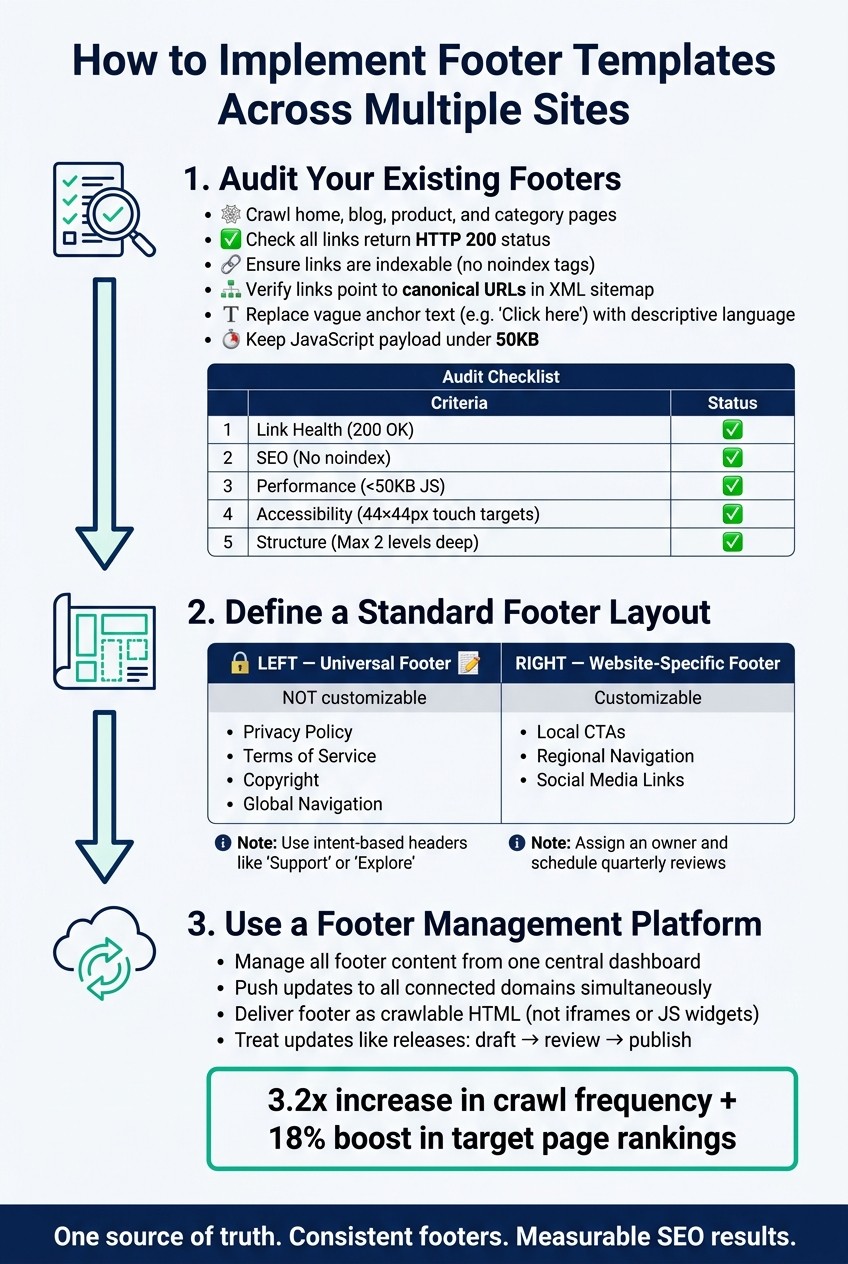
How to Implement Footer Templates Across Multiple Sites
Simplify managing footers across multiple sites by following these three steps.
Step 1: Audit Your Existing Footers
Start by auditing your current footers to get a clear picture of their current state. Crawl a variety of pages - home, blog, product, and category - to extract all footer links. Check that each link:
Returns an HTTP 200 status code
Is indexable (no
noindextags)Points to a canonical URL listed in your XML sitemap
Don’t overlook anchor text. Swap out vague phrases like "Click here" or "Learn more" for descriptive, meaningful language that provides context for both users and search engines. Also, evaluate your footer’s JavaScript payload - keeping it under 50KB is crucial for maintaining strong Core Web Vitals, especially Interaction to Next Paint (INP) scores.
Here’s a quick checklist to guide your audit:
Audit Area | What to Check | Target |
|---|---|---|
Link Health | HTTP status code | 200 OK only |
SEO | Indexability | No |
Performance | JavaScript payload | Under 50KB |
Accessibility | Touch target size | 44×44px minimum |
Structure | Information hierarchy | Max 2 levels deep |
Once you’ve completed the audit, you’ll have the insights needed to create a unified footer layout.
Step 2: Define a Standard Footer Layout
After identifying inconsistencies or issues, develop a canonical footer model - a master layout that outlines required and optional elements. A two-part structure works best: a Universal Footer for global elements and a Website-Specific Footer for localized customizations.
Universal Footer elements - like Privacy Policy, Terms of Service, copyright notices, and global navigation links - should remain consistent across all sites. Meanwhile, customizable elements - such as local CTAs, regional navigation, or social media links - allow for flexibility without disrupting the overall design. Use intent-based headers like "Support" or "Explore" instead of internal jargon to improve clarity.
As Dasha, a designer at Eleken, explains:
"The same principles apply when you're designing a website footer or structuring utility navigation inside a SaaS app. Either way, prioritize clarity, accessibility, and don't overload users with links they'll never click." - Dasha, Designer, Eleken
To keep your footer content relevant, assign someone to oversee it and schedule quarterly reviews. This ensures broken links, outdated content, or legal inaccuracies are addressed promptly.
Once your standardized layout is ready, focus on deploying it effectively.
Step 3: Use a Footer Management Platform
Creating a standard layout is one thing, but rolling it out across multiple sites can be challenging. That’s where a centralized tool like 1Footer comes in. This platform lets you manage shared footer content - like legal links, branding, and cross-site navigation - from one dashboard. You can then push updates to all connected domains at once.
1Footer ensures that your footer content is delivered as crawlable HTML, making it easy for search engines to index. Treat footer updates like any other release: draft, review, and publish with intention. This approach keeps your multi-site infrastructure consistent and ready for audits.
Conclusion: Make Footer Management Easier with Templates
Managing footers across multiple sites can feel like an endless chore. Legal links can become outdated, designs lose alignment, and even a minor compliance update might require changes across dozens of repositories. Daniel Sinewe, Founder of 1Footer, sums it up well:
"If you are an indie hacker, footer drift is a real tax. A legal link changes and half your projects are outdated."
Using standardized footer templates transforms this chaotic process into a streamlined system. Instead of manually updating each site, you maintain a single source of truth and roll out updates universally. This approach not only simplifies management but also delivers measurable results: pages with unified footer links experience a 3.2x increase in crawl frequency and an 18% improvement in target page rankings.
Templates also bring consistency and reliability to compliance and accessibility efforts. Centralizing legal links like Privacy Policy or Terms of Service ensures that regulatory updates are applied across all sites simultaneously, eliminating gaps. Plus, tools like 1Footer provide footer content as crawlable, domain-native HTML - not iframes - making it easier for search engines to index those links.
FAQs
What should be universal vs. site-specific in a footer template?
A universal footer should always feature consistent elements like branding, copyright notices, and essential legal links to maintain uniformity across all sites. On the other hand, site-specific content - such as customized navigation links or localized contact details - can help address the unique needs of a particular audience. It's important to keep the universal footer intact and unchanged, while the site-specific section can be tailored as needed, but it should never replace the universal footer.
How can footer templates reduce legal compliance risk across domains?
Footer templates play a crucial role in reducing legal compliance risks. By including essential legal links - such as privacy policies and terms of service - they ensure this critical information is consistently updated across all websites. This helps prevent outdated or missing details that might lead to compliance issues. For teams managing multiple domains, standardized templates simplify the process, making it easier to maintain accuracy and consistency across the board.
Will a centralized footer hurt SEO or Core Web Vitals?
A well-executed centralized footer, especially when managed with a tool like 1Footer, won't negatively affect SEO or Core Web Vitals. It provides crawlable HTML and ensures consistent internal linking across your site. That said, steer clear of using too much JavaScript or overly intricate elements in the footer, as these can hurt performance metrics like INP (Interaction to Next Paint).