
Why Footer Automation Saves Time
Footer automation simplifies managing website footers across multiple sites, saving time and reducing errors. Instead of manually updating each site, a centralized system allows you to make changes once and apply them everywhere instantly. This prevents outdated content, ensures consistency, and avoids repetitive tasks.
Key Points:
Centralized Updates: Manage footers for multiple websites from one dashboard.
Time Savings: Automating updates can save up to 90% of the time spent on manual tasks.
Error Reduction: Eliminates common mistakes like outdated copyright years or broken links.
Improved Compliance: Ensures legal and policy updates are consistent across all sites.
For teams managing multiple websites, footer automation transforms a tedious process into an efficient, reliable system.
How Workflow Automation Saves Time: Research Findings
Research clearly demonstrates the time-saving power of automation. In fact, automation technologies can now handle 57% of total U.S. work hours. On top of that, 82% of task reductions previously handled by humans are directly linked to automation adoption. These numbers highlight how automation is transforming workflows across various industries.
Key Numbers on Workflow Automation
The impact of automation is evident across sectors. For instance, IT teams save more than 30 minutes per support ticket by leveraging automation. HR departments also see major benefits, with automated onboarding reducing both time and costs by 10–20%. A great example comes from 2026, when Remote's IT team used Zapier automation to streamline repetitive data routing in their support system. The result? They saved 616 hours and avoided nearly $500,000 in potential hiring expenses.
Beyond saving time, automation also boosts accuracy. Research shows that under routine conditions, automated processes outperform manual ones in both speed and precision. Additionally, automation reduces mental strain by taking over the repetitive decision-making tasks that often bog down workers.
Applying Automation Research to Footer Management
Footer management is a prime example of a repetitive task that benefits from automation. Anytime a legal link changes or a new product page is added, someone has to manually update every site in the portfolio. This repetitive process makes footer management an ideal candidate for automation.
"1Footer moves that work into a centralized model... Instead of opening many repos and deployment pipelines, you update one governed artifact and distribute it everywhere." - Daniel Sinewe, 1Footer
Using a centralized "operations layer" for footer management applies the same principle that saves IT teams so much time per support ticket. Instead of updating multiple repositories and deployment pipelines manually, a single update can be distributed across all sites. For teams managing 5, 10, or even 20 sites, this approach eliminates countless repetitive tasks, delivering significant efficiency gains. These time savings highlight why manual footer management can be so inefficient.
The Problems With Manual Footer Management
At first glance, updating a footer might seem like a straightforward task. But when you’re managing multiple websites, it quickly turns into a massive time sink, eating up hours every week.
Steps Required for a Manual Footer Update
Every manual footer update involves a long, repetitive process: identifying all the sites that need changes, logging into each one, finding and editing the footer (sometimes in multiple locations), saving or redeploying the changes, clearing the cache, and finally, checking that everything looks right on both desktop and mobile. It’s a tedious cycle that highlights just how inefficient manual updates can be.
Now imagine doing this for 10 websites. That same process has to be repeated 10 times. And if those sites use different tech stacks, things get even trickier.
This is where footer drift becomes a real issue. Maybe one site gets updated, but others are overlooked. The result? Inconsistent legal disclaimers, outdated social media links, or copyright years that make your site look neglected. As Kara Weech from Palme Design Co. explains:
"An outdated year can create just enough hesitation to matter - especially for service-based businesses."
Estimating the Annual Time Cost
The time spent on these manual updates adds up fast. Research shows that managing multiple sites can take up about 2 hours and 20 minutes each day. Footer updates may only be a portion of that, but they’re a recurring task that adds to the pile.
Let’s break it down: a team responsible for 10 websites, performing footer updates 12 times a year, and spending 20 minutes per site update ends up dedicating 40 hours annually to footer work alone. And that’s a conservative estimate - it doesn’t include fixing mistakes, revisiting missed sites, or the mental toll of switching tasks. Studies suggest the real cost of manual work is often 3 to 5 times higher than the direct labor hours, once you factor in things like lost productivity and interruptions.
For teams managing larger site portfolios or dealing with frequent updates, the time drain can easily balloon to a full work week (or more) spent solely on keeping footers up-to-date.
Time Saved With Automated Footer Updates
Automating footer updates doesn't just make workflows smoother - it also slashes the time spent on repetitive tasks. For teams managing multiple websites, manual footer updates can take as much as 120 hours a year. With automation in place, that time can be redirected toward more strategic and impactful projects.
How a Single-Source Update System Works
A single-source update system simplifies the process by using a centralized dashboard to manage footer updates across all connected websites. This system allows global changes - like legal disclaimers or copyright updates - to be applied instantly, while site-specific elements, such as logos or local menus, remain untouched. The result? A more efficient process that saves time without sacrificing customization.
Estimated Annual Hours Saved
Workflow automation can reduce time spent on tasks by anywhere from 50% to 90%, depending on how complex the process is. Let’s break it down: imagine a team managing 10 websites, updating footers 12 times a year, and spending one hour per site per update. That adds up to 120 hours annually. With a 90% automation rate, those 120 hours drop to just 12 - a savings of 108 hours. Even with a modest 50% reduction, the team would still save 60 hours a year. That’s a significant chunk of time that could be used for more valuable initiatives.
Example: How 1Footer Handles Multi-Site Updates
This isn't just theoretical - tools like 1Footer bring these time savings to life. 1Footer connects multiple domains to a single dashboard, allowing shared footer content to be updated across platforms like Next.js, WordPress, and static HTML sites with just one click. For SEO purposes, it injects HTML directly into each page, ensuring search engines can crawl the footer effectively. Plus, automated verification checks ensure all footer links are live and functional, removing the need for tedious manual checks.
"If your footer spans multiple sites, treat it like infrastructure instead of copy-paste UI." - Daniel Sinewe, Indie Hacker
Other Benefits: Compliance, Fewer Errors, and Faster Updates
Automation doesn’t just save time - it transforms how footers are managed by ensuring consistent compliance, reducing errors, and enabling rapid updates across websites. These improvements help mitigate legal risks, prevent costly mistakes, and allow urgent changes to take effect in minutes rather than days.
Keeping Legal Disclosures Consistent Across Sites
Website footers often include links to essential legal documents like Privacy Policies, Terms of Service, and Cookie Policies. These need to be updated promptly when regulations change, policies are revised, or rebranding occurs. However, manual processes rarely ensure all sites are updated at the same time, leading to footer drift - where some sites display outdated information while others are current. A centralized footer system addresses this issue by treating updates like governed releases. Each update is drafted, reviewed, published, and verified, ensuring every connected domain reflects the change simultaneously.
Reducing Human Error in Footer Updates
Manual updates come with their fair share of mistakes. One common issue is outdated copyright years - many sites forget to update this detail each January. Hardcoded footers are also prone to errors like broken links or outdated contact details, often scattered across multiple repositories that aren’t regularly checked. In fact, a 2026 audit revealed that 67% of sites suffered from poor manual management of footer link structures, which diluted internal link equity. Automation eliminates these problems by automatically updating copyright years, verifying link integrity after each publish, and synchronizing updates across all sites at once.
"Small details like an accurate footer year help reinforce professionalism and care. No one emails you to compliment it… but people absolutely notice when it's wrong." - Kara Weech, Palme Design Co.
These small but meaningful improvements not only simplify operations but also enhance the overall return on investment for automated footer updates.
Rolling Out Changes Faster
When legal deadlines are tight or policy changes need immediate implementation, speed becomes critical. Manual updates require accessing multiple repositories, making individual edits, and running separate deployment pipelines - a process that can take hours or risk delays. Automation condenses this into a single streamlined action.
"Instead of opening many repos and deployment pipelines, you update one governed artifact and distribute it everywhere." - Daniel Sinewe, Founder, 1Footer
1Footer is a great example of this efficiency. With a single publish event in its dashboard, updated footer HTML is distributed across all connected domains simultaneously. Automated verification ensures that every link is live and functional. For teams facing regulatory deadlines or time-sensitive changes, this speed significantly reduces risks and headaches.
Calculating the ROI of Footer Automation
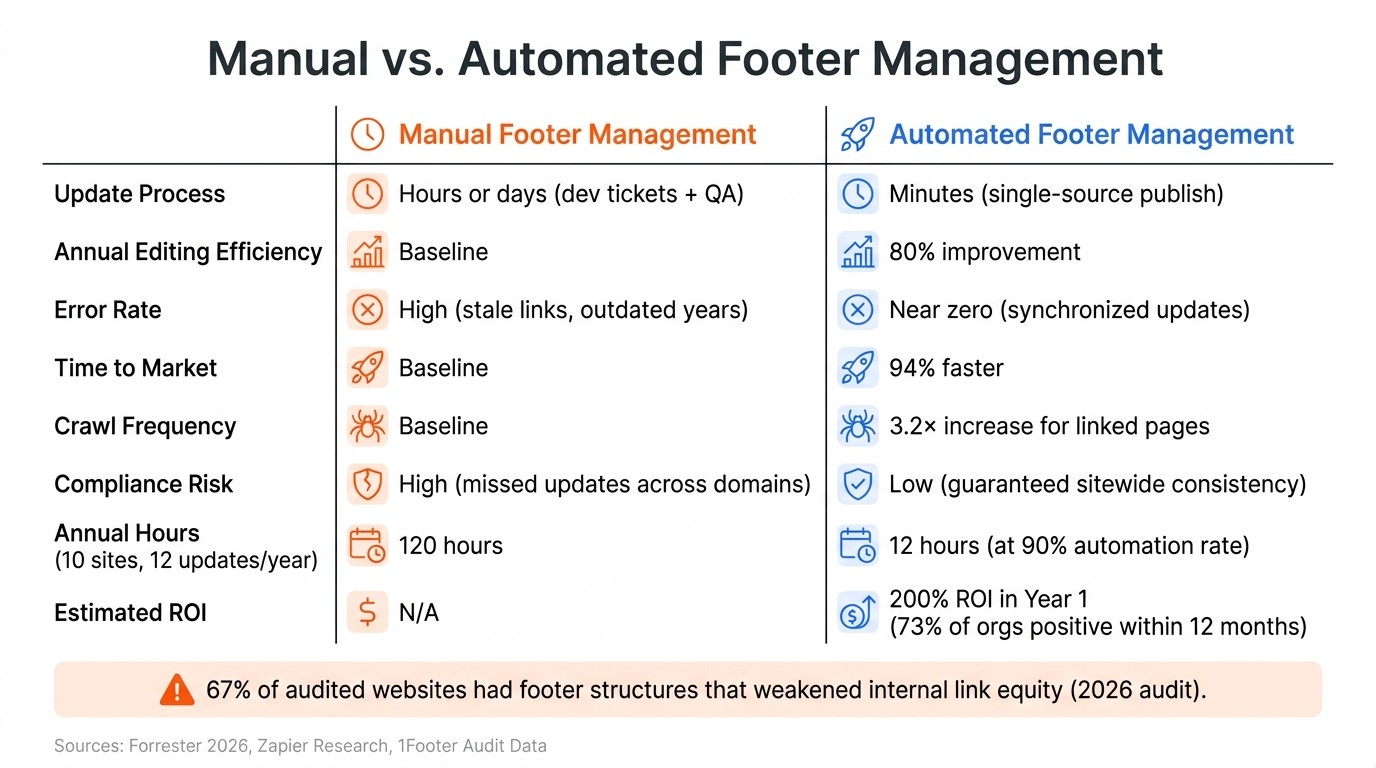
Manual vs. Automated Footer Management: Time, Cost & Accuracy
When we talk about automation, it's not just about saving time - it’s also about understanding the financial payoff. To measure the return on investment (ROI) for footer automation, you can use a straightforward formula: Annual ROI = (Hours saved per week × Loaded hourly cost × 52) + Recovered revenue + Error reduction savings − Total automation cost. The accuracy of this calculation depends on reliable inputs, especially the loaded hourly rate and the actual time spent on manual updates.
Converting Time Saved Into Dollar Savings
One common issue teams face is underestimating the time spent on manual footer updates - often by as much as 30%–50%, thanks to overlooked factors like switching between tools or regaining focus. Let’s break it down: a team member earning $55,000 annually costs about $36 per hour when you include salary, benefits, taxes, and overhead. For senior staff or founders, this number can climb to $75–$150 per hour.
When you add up all the hours spent on manual updates, even at $36 per hour, the labor costs quickly become substantial. Plus, there’s the added expense of fixing mistakes - like broken links or outdated information. The savings from automation don’t just stop at labor costs; they multiply when you factor in error correction. On average, automation projects have been shown to deliver a 200% ROI in the first year, with 73% of organizations seeing positive ROI within 12 months.
"If you're doing $25/hour work, you're the most expensive person on the team doing the cheapest work." - Silviya Velani, Founder, Builts AI
These savings are just the beginning. The real value comes when employees can shift their focus to more impactful work.
Soft ROI: Freeing Up Employee Time for Higher-Value Work
Beyond the direct financial savings, automation unlocks time for employees to focus on strategic tasks. Developers no longer need to spend hours editing template files, managing deployment pipelines, or hunting down outdated copyright years. Instead, they can work on projects that help grow the business.
A 2026 Forrester study revealed that organizations automating web experience management, including footers, saw an 80% boost in content editing efficiency and a 94% reduction in time to market for digital content. For example, a $2 billion company saved $863,187 in labor costs over three years by freeing developers from routine tasks. The trick is to tie these efficiency gains to tangible outcomes - like cutting contractor hours or reducing overtime - to turn time savings into real financial benefits.
"Automation frees our developer up to continue working on the tasks that require development, and our [web strategy] team can now address [website] maintenance issues. We find the problem; we solve the problem and deploy it in minutes." - Director of Web Strategy, Security Software
Manual vs. Automated Footer Management: A Side-by-Side Comparison
The benefits of automation become even clearer when you compare it directly to manual management:
Metric | Manual Footer Management | Automated Footer Management |
|---|---|---|
Update Process | Hours or days (dev tickets + QA) | Minutes (single-source publish) |
Annual Editing Efficiency | Baseline | 80% improvement |
Error Rate | High (stale links, outdated years) | Near zero (synchronized updates) |
Time to Market | Baseline | 94% faster |
Crawl Frequency | Baseline | 3.2× increase for linked pages |
Compliance Risk | High (missed updates across domains) | Low (guaranteed sitewide consistency) |
One standout metric here is crawl frequency. Since footer links appear on every page of a site, optimizing a single footer on a 500-page website is equivalent to improving 500 internal links. Automation ensures these links are always accurate and strategically placed, eliminating the need for manual checks after every update. When you add up all these benefits - fewer errors, faster updates, and measurable time savings - it’s easy to see why footer automation is such a smart move for businesses.
Conclusion: The Case for Footer Automation
When you weigh the research and advantages, it becomes strikingly clear just how inefficient manual footer management is. The hidden costs of these outdated processes add up quickly across multiple sites. Every update means diving into various repositories, working through pipelines, and double-checking that all changes are applied correctly - a tedious and error-prone process. This is where automation steps in as a game-changer.
Daniel Sinewe highlights this perfectly: 1Footer treats footers as shared infrastructure. This means a single change updates all sites instantly, eliminating the need for repetitive manual adjustments across multiple domains.
The risks of sticking to manual methods are hard to ignore. By April 2026, 67% of audited websites had footer structures that weakened internal link equity. And the problem doesn’t stop with SEO - legal disclosures that vary between sites can lead to regulatory gaps. Automation solves this by ensuring updates are applied consistently, delivering both speed and compliance in one move.
With 1Footer, you get a centralized control panel that simplifies managing legal links, navigation, and branding across your entire web presence. Plus, it ensures every domain delivers crawlable HTML, keeping things streamlined and search-engine friendly.
The takeaway? Footer automation isn’t just for massive operations. Whether you’re running a handful of sites or dozens, the time saved, errors reduced, and compliance risks avoided make it one of the smartest upgrades your web team can implement.
FAQs
Which footer changes should be centralized vs. site-specific?
Centralizing footer updates is a smart way to maintain consistency across all domains. Elements like legal links, shared badges, and navigation blocks can be standardized, ensuring uniformity and reducing the need for repetitive updates.
At the same time, site-specific changes - such as logos, brand-specific navigation, or localized policies and contact details - should remain customizable. This allows each site to retain its unique identity while adhering to the broader framework.
By combining centralized management with flexibility for unique details, you can streamline updates, avoid redundant work, and minimize the risk of configuration drift.
How do I measure ROI from footer automation for my team?
To calculate ROI, use this formula: ((Annual Benefit − Annual Cost) ÷ Initial Investment) × 100.
Start by figuring out the benefits. Add up factors like time saved, fewer errors, better efficiency, and reduced risks. For example, multiply the minutes saved per update by how often updates occur and the hourly labor costs. Then, subtract the costs of a 1Footer subscription, setup, and maintenance from these savings. The result is your net ROI.
Tools like 1Footer make this process easier by streamlining updates, ensuring consistency, and cutting down on manual work.
Will automated footers stay crawlable for SEO on every page?
Automated footers are still crawlable when they are delivered using domain-native HTML rather than relying on client-side JavaScript or obfuscated wrappers. 1Footer optimizes for search engines by embedding footer content directly into the rendered response, using methods like server-side or edge middleware. This ensures search engines can reliably find links, enhancing indexing and making sure your key pages remain easily accessible to crawlers.