
How to Measure Navigation Link Effectiveness
Footer navigation links are often overlooked but play a key role in user experience, SEO, and conversions. Measuring their effectiveness ensures your website's footer supports user needs and business goals. Here's what you need to know:
Why Footer Links Matter: They act as a "safety net" for users, help distribute internal link equity, and provide consistent navigation across pages.
Tracking Performance: Use tools like Google Tag Manager (GTM) and Google Analytics 4 (GA4) to monitor click-through rates (2–5% is typical), scroll depth, and user paths.
Key Metrics: Focus on footer click-through rates, assisted conversions, and exit rates after deep scrolling.
Improving Footer Links: Fix broken links, test variations (e.g., labels or grouping), and update structures regularly to align with user behavior and goals.
multi-site governance: Standardize link naming and structure across websites for consistent data and easier comparisons.
Takeaway: Footer links may have lower engagement than main navigation, but they often influence high-intent users. Proper tracking and regular updates can transform your footer into a powerful tool for conversions and SEO.
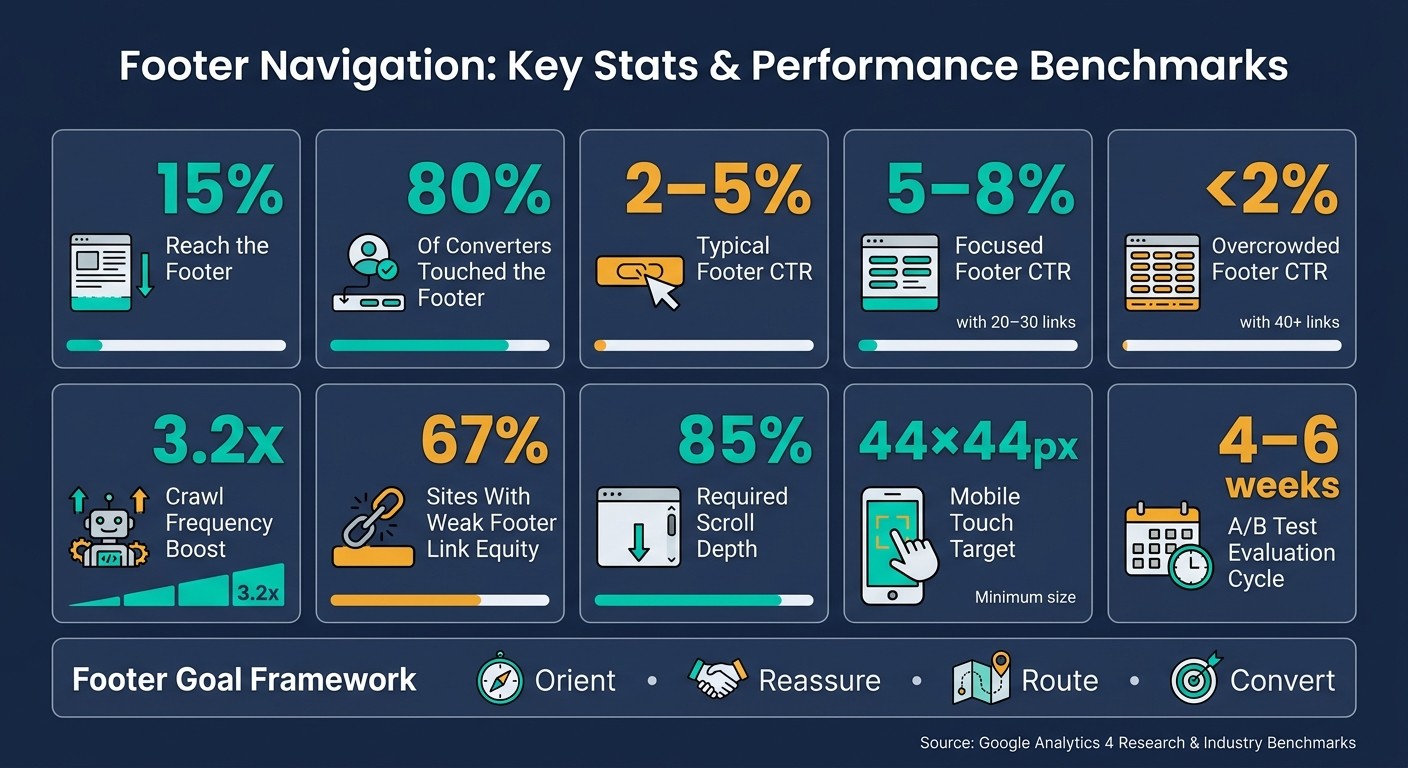
Footer Navigation: Key Stats & Performance Benchmarks
How Links in Headers, Footers, Content, and Navigation Can Impact SEO - Whiteboard Friday
Building a Measurement Framework
Start with clear goals and an accurate link inventory to ensure your data is actionable and insightful.
Define Your Footer Navigation Goals
Each footer link should serve a purpose, following the "Orient, Reassure, Route, Convert" framework. The footer should help users understand where they are, trust your brand, locate what they need, and take meaningful actions.
Here’s how to set goals for your footer links across key categories:
Goal Category | Specific Objectives | Key Metrics to Track |
|---|---|---|
Navigation | Help users access hard-to-find content | Footer CTR; exit rate after deep scrolling |
Conversion | Encourage secondary actions (e.g., demos) | Assisted conversion paths; CTA clicks |
Trust/Legal | Build confidence; meet compliance needs | Visits to Privacy/Security pages |
Support | Address common support questions | Clicks to FAQ or Contact; support ticket volume |
SEO | Enhance crawlability and link equity | Crawl coverage; page authority distribution |
Here’s an interesting fact: while only about 15% of visitors scroll far enough to see the footer, up to 80% of those who convert may have interacted with it at some point. This highlights the importance of taking footer goals seriously.
Build a Footer Link Inventory
Once your goals are in place, create a detailed inventory of every footer link across your site - or even multiple sites if applicable. This inventory forms the backbone of accurate tracking and analysis. Group links into categories like Company, Products/Services, Support, Legal, and Resources for better organization.
For teams managing multiple sites, tools like 1Footer can simplify the process. It allows you to manage shared footer content - such as legal links or product references - across different domains from one platform. This ensures your inventory remains accurate without the need for manual checks.
"Internal links are one of the most powerful tools you have for communicating page importance to Google - and the footer is the highest-leverage placement on your entire site." - Google Search Central
As you build your inventory, ensure every link directs to a canonical, indexable URL with a 200 status code. Broken links and redirect chains are more common than you might think. A 2026 audit revealed that 67% of websites had footer link structures that weakened internal link equity.
Standardize Link Groups and Names
Consistency in naming is critical for making analytics data useful. If one site uses "Privacy Policy" and another uses "Privacy", your reports will split these into separate items, leading to unreliable comparisons.
Start with a four-column structure: Product, Resources, Company, and Trust/Legal. Use clear and descriptive labels - avoid vague terms like "Platform" and opt for terms like "Pricing" or "Features" that are more specific. Keep each column concise, with 3–5 links, to maintain clarity and preserve link equity.
Standardized categories also simplify event tracking. Once your link groups are consistent, setting up event tracking becomes much easier, and you’ll be ready to connect these events to your key metrics. This structured approach lays the groundwork for precise analytics in the next phase.
Setting Up Analytics to Track Footer Links
Once you’ve organized your link inventory and standardized naming conventions, it’s time to focus on tracking and analyzing how users interact with footer links. This step ensures you capture valuable data about user behavior.
Set Up Event Tracking for Footer Links
By default, GA4's "Enhanced Measurement" only tracks clicks on outbound links. It doesn’t automatically record interactions with internal footer links. To address this, you can use Google Tag Manager (GTM) to set up custom tracking.
Start by inspecting your footer’s HTML structure. Look for a unique container, such as <footer class='site-footer'>, or a consistent CSS class like .footer-link. These elements will help you define the conditions for your tracking trigger.
Here’s how to set it up in GTM:
Enable built-in variables: Turn on variables like Click Element, Click Classes, Click Text, and Click URL in the Variables configuration.
Create a trigger: Use a "Just Links" trigger that activates whenever a clicked element matches the CSS selector
footer, footer *.Build a GA4 event tag: Name the event
footer_clickand include parameters such as:menu_typeset tofooter_navigationlink_textusing{{Click Text}}link_urlusing{{Click URL}}.
Once you publish these changes, use GA4 DebugView to confirm that the event parameters are captured correctly. This setup ensures that footer interactions are tracked separately from other navigation events.
Separate Footer Links from Other Navigation
To avoid mixing footer link data with other navigation events, use the menu_type parameter to isolate footer-specific interactions. Without this distinction, analyzing footer performance becomes challenging.
If your footer links don’t have a consistent CSS class, you can create a Custom JavaScript variable in GTM. This variable detects if a clicked element’s parent is a <footer> tag and assigns "footer" as the page_section value. This solution is particularly helpful for managing multi-site setups with varying footer designs.
Don’t forget to register custom parameters like menu_type as event-scoped Custom Dimensions in GA4 Admin. Without this registration, these parameters won’t show up in standard GA4 reports.
Connect Footer Events to Key Metrics
Once you’ve isolated footer link data, connect these events to your business goals. For example, use GA4’s Path Exploration reports to see where users go after clicking a footer link. This can help you identify whether these interactions lead to important pages, such as pricing or contact forms.
To further enhance your analysis, link footer_click events to your conversion tracking. For instance, track how footer links contribute to micro-conversions (like newsletter signups or resource downloads) and macro-conversions (such as lead form submissions or purchases). Additionally, keep an eye on crawl frequency for pages linked in the footer. Research shows that sitewide footer links can boost crawl frequency by an average of 3.2x, which is a valuable SEO signal.
Analyzing Footer Navigation Link Performance
Engagement Metrics to Track
Once tracking is set up, the next step is identifying the metrics that matter most. One key metric is the footer click-through rate (CTR), which typically falls between 2% and 5% and serves as a direct measure of how visitors engage with footer links. To get accurate insights, you’ll also need to monitor scroll depth - aim for at least 85% scroll depth to confirm that users are actually reaching the footer. This highlights how crucial it is to optimize footer visibility to drive conversions.
Tracking unique users is another important aspect. The "Total Users" metric in Google Analytics 4 (GA4) provides a clear picture of how many individual visitors interact with your footer. Segmenting this data by device type is essential, as user behavior can vary significantly between mobile and desktop. For instance, a link that performs well on desktop might struggle to grab attention on a smaller mobile screen.
Once you’ve established these engagement metrics, the next step is to analyze how footer interactions influence user behavior and conversions.
Behavior and Conversion Analysis
After confirming engagement, it’s time to dig into what happens next. Footer clicks often mark the start of a user journey, and understanding this journey is key. GA4’s Path Exploration report can help by letting you set a footer_click event as the starting point. This allows you to trace user paths after a footer interaction or examine the events leading up to a conversion.
Another area to focus on is assisted conversions. These occur when a footer link contributes to a conversion, even if it’s not the final click. This is especially relevant for pages like "Pricing", "Contact", or "About", which often play a supporting role in the decision-making process. Additionally, monitoring the exit rate after deep scroll can provide valuable insights. If users scroll to the footer and then leave the site, it might signal that the footer isn’t offering a compelling next step.
Cross-Site Comparisons for Multi-Site Footers
If you manage multiple websites, consistent tracking across all sites is essential for meaningful comparisons. Using standardized event parameters in your analytics setup ensures that performance discrepancies are due to design differences rather than inconsistent data collection. For example, each site should fire the same footer_click event with identical parameters like menu_type, menu_item, and page_section.
Tools like Looker Studio can simplify this process by connecting GA4 properties and creating dashboards that summarize key metrics like footer clicks, CTR, and unique user interactions across all sites. This makes it easier to spot which sites have more effective footer engagement.
Maintaining consistent footer structures across your sites also enhances the reliability of your analysis. For multi-site teams, tools like 1Footer can streamline the process by managing and publishing uniform footer updates. This ensures that any performance differences you observe are due to actual design or content variations, not inconsistencies in layout or naming conventions.
Improving Footer Navigation Based on Data
Once you've set up analytics and reviewed performance, here are some practical steps to refine your footer navigation.
Find and Fix Underperforming Links
Start by analyzing engagement data to spot footer links with a click-through rate (CTR) below 2%. These low-performing links often result from issues like broken URLs, unclear labels, or confusing category names. Fixing these can lead to noticeable improvements. For example:
Replace vague labels with clear, keyword-focused text.
Address broken links or 404 errors promptly.
Use an Impact-Effort Matrix to prioritize tasks. Quick fixes like relabeling links or correcting errors should come first, while larger projects, like reorganizing the entire taxonomy, can be scheduled later.
Also, ensure mobile usability by designing touch-friendly links with targets of at least 44×44 pixels.
"The footer should help an undecided buyer find the next best proof, page, or action in under five seconds." - Ed Abazi, Co-founder, Raze Growth
Run A/B Tests on Footer Links
After fixing underperforming links, validate your updates with A/B testing. Experiment with variables like link labels, order, and grouping. For instance, test a minimal footer with only essential links against a comprehensive one. Research shows that focused footers with 20–30 links often achieve CTRs between 5–8%, while those with over 40 links typically fall below 2%.
Run each test for at least two weeks to achieve 95% statistical confidence. Ensure your event tracking captures which variation users interact with and standardize parameters like link categories, destination URLs, and page templates. This consistency ensures clean, comparable data.
Review and Update Footer Structures Regularly
Refining your footer isn’t a one-time task. Use ongoing data insights to make regular updates:
Monthly Maintenance: Fix broken links, update contact details, and refresh the copyright year.
Quarterly Reviews: Align footer links with current business goals, maintain internal link equity, and ensure your XML sitemap stays consistent.
Evaluate A/B test results every 4–6 weeks to gather enough data before implementing permanent changes.
For streamlined updates, tools like 1Footer can help maintain uniform structures and naming conventions across all your sites.
Conclusion: Key Takeaways for Measuring Footer Navigation Effectiveness
Measuring the effectiveness of footer navigation revolves around three core principles: setting clear goals, implementing precise tracking, and making regular, data-informed updates. Without well-defined goals, tracking efforts lack focus; without accurate event tracking - such as using Google Tag Manager to monitor footer clicks - data can become unreliable; and without periodic reviews, even a well-optimized footer can lose alignment with your site’s objectives. These steps form the foundation for meaningful analytics and ongoing improvements.
It’s worth noting that footer click-through rates (CTRs) typically fall between 2–5%, much lower than the rates for main navigation. This difference highlights the footer’s role as a secondary navigation tool, primarily serving high-intent visitors. While only about 15% of users scroll far enough to see the footer, research shows that up to 80% of converting users may interact with it. This makes footer engagement a crucial metric to monitor closely.
"The footer is usually the last interface element a visitor sees before exiting, looping back, or taking another step." - Mërgim Fera, Co-founder, Raze
For teams managing multiple sites, maintaining consistent footer structures can simplify analytics and improve SEO. Tools like 1Footer help streamline updates across sites, ensuring a uniform link structure that supports both tracking and search engine performance.
Though small in size, the footer plays a significant role in shaping user behavior. Treat it as an integral part of your site’s architecture, applying the same level of analytical focus you would to any other key element influencing conversions.
FAQs
How do I track internal footer link clicks in GA4?
To track internal footer link clicks in GA4, you can use Google Tag Manager (GTM) to create a custom event. Start by enabling GTM's built-in click variables, such as Click URL and Click Text. Then, set up a Just Links trigger that focuses on links within your domain. To specifically target the footer, apply a condition like CSS selectors to narrow it down.
When naming the event, choose something descriptive to make it easy to identify in your reports. Additionally, register custom dimensions in GA4 to gain more detailed insights into the link click data.
If you're looking for extra help, tools like 1Footer can simplify the process by ensuring consistent link attributes across your site.
What’s a good footer link click-through rate (CTR) to aim for?
Footers don’t have a one-size-fits-all formula, but the number of links you include can significantly impact engagement. Footers with 20–30 well-chosen links often achieve click-through rates (CTRs) of 5%–8%. On the other hand, cramming in 40+ links can overwhelm users, leading to a drop in CTRs to below 2%.
To boost CTR, think of your footer as a secondary navigation tool. Focus on linking to high-priority pages instead of overloading it with unnecessary options.
How can I tell if footer clicks actually help conversions?
To figure out if footer clicks contribute to conversions, start by setting up event tracking in tools like Google Tag Manager. Use GA4 to create custom events that track footer clicks and mark them as conversion goals.
Next, dive into user behavior data. Look at how these clicks align with conversion paths. If you notice a lot of interaction with footer links - like those pointing to pricing pages or demo requests - it’s a good sign that these links are helping guide users toward taking action.